|
|
Groups: Member
Joined: 3/10/2012
Posts: 46
Rank:
 (2509) (2509)
|
Hello,
I used to use My Movies for my Sony BDP-CX7000es blu-ray changer. I had some problems with the blu-ray changer so I sold it but I recently bought a new one from eBay and wish to use My Movies like I used to.
But on the feature page, I no longer see anything related to the changer.
Is it still supported in My Movies?
I sure hope so.
Can someone point me to a thread on how to set it up?
How many points does it require so I'll know what to purchase?
Thanks,
--Jason
|
|

Groups: Administration
, Member, Moderator
Joined: 6/30/2010
Posts: 4,066
Rank:
 (140491) (140491)
|
I have three of them all up and running at this moment so yes the feature is still there.
Those mega-changers were a part of how I wound up a moderator as I was pestering Brian the developer to try and iron out a few bugs and update the code for 64 bit Windows (shows how long ago that was) and I finally persuaded him to let me have a crack at them if he didn't have the time as fortunately the dll was in visual basic which I know, though all the .net integration stuff was beyond me I managed to figure it in the end and get the power up sequences working fully and the older DVD version working in 64 bit.
I had to look for the point requirement, its 2500 as I thought, it is in the list if you go to Collection Management then help - feature table and scroll down. The old DVP-CX777ES DVD changer also should still work.
If you want to check how it all works and don't have 2500 points then provided you haven't previously used it you should be able to use the request free trial option I think to unlock all features for 21 days.
There isn't a setup thread that I know of but it is not difficult though you won't find a serial port of any current PC but you can easily get a USB to serial/RS232 adapter. You just need to connect that assign it a com port (it will probably get one by default but you may need to go into device manager to find which it is or assign a specific selection) then just open Collection Management go to Tools and click disc changers. Click add changer, give it a name and set the type and com port assignment and save. Then you need to go to each disc title's disc tab and select the relevant disc, choose DVD changer (in slot) for the location type, then two more boxes will appear at the bottom to select the changer and enter the slot number, then ok and save the profile. I honestly don't remember if the load changer discs option actually works for the BD player.
|
|
Groups: Member
Joined: 3/10/2012
Posts: 46
Rank:
(2509)
|
Thanks for the info.
I used a USB to serial converter along with a female to female DB9 cable, but can't seem to get it to work. I just ordered a Null Modem cable from Amazon and will try that.
Does anyone know if the load all discs feature will now load DVD's in addition to Blu-Rays? I have mostly TV Seasons in the changer on DVD and would hate to have to enter 400 titles manually.
Thanks,
--J
|
|
Groups: Administration
, Member, Moderator
Joined: 6/30/2010
Posts: 4,066
Rank:
(140491)
|
It does need to be a null modem cable I think which is not wired the same as a standard serial cable which won't work.
I don't remember what functionality the load changer discs function actually has any more. I am not sure it would work well anyway as you would be heavily disc ID dependent even if the functionality all works.
Generally you will need to set this up manually but only once. If what you have a TV series disc titles then you will want to add the relevant disc titles to your collection, the best way being by barcode, then make sure the disc tab contains all the relevant discs and set the changer locations for each disc. If you want episode meta data you would also need to map the episode to the disc structures, then depending on whether you choose to view as discs or TV series data in the WMCE interface you would have either disc or episode based selection options. Though some DVDs and any Blu-ray that uses Java will not allow direct episode selection and always go to the disc menu or first episode or some other option.
|
|

Groups: Member
Joined: 2/17/2011
Posts: 377
Location: The Sunshine State, U.S.A.
Rank:
 (3832) (3832)
|
I posted the below screenshots in another forum last year showing what's involved to configure the Collection Management application. It's an older version of My Movies, but still applicable I'm sure. Sounds like you have a handle on this already jevansoh, so for the benefit of others perhaps listening in. Tools->Disc Changers: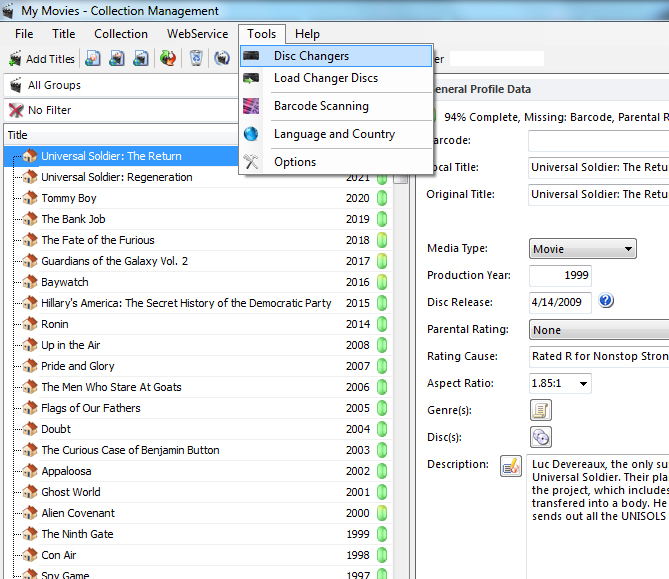 Tools->Disc Changers->Configure Disc Changers: Tools->Disc Changers->Configure Disc Changers: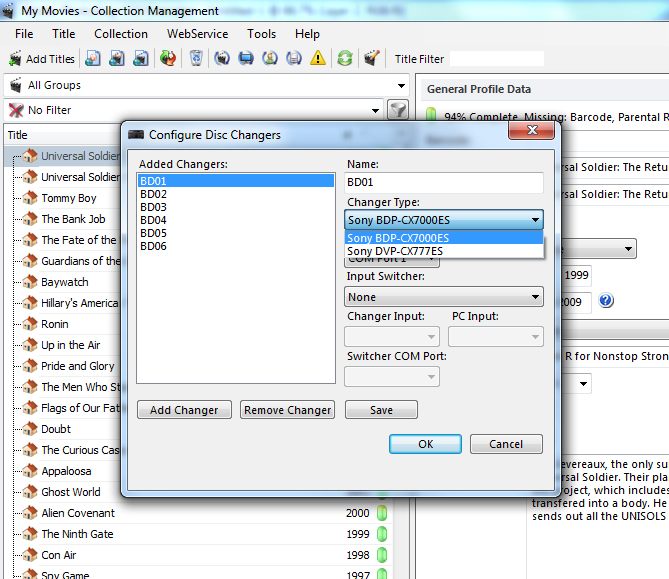 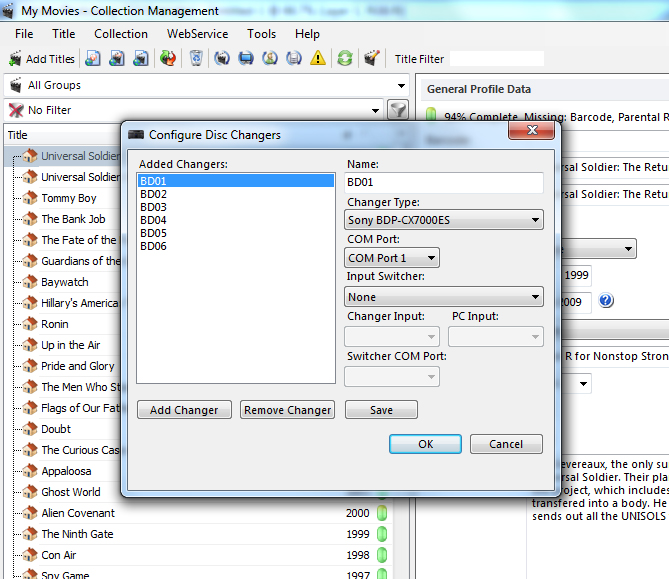 Title->General Profile Data->Discs->Assign Discs: Title->General Profile Data->Discs->Assign Discs: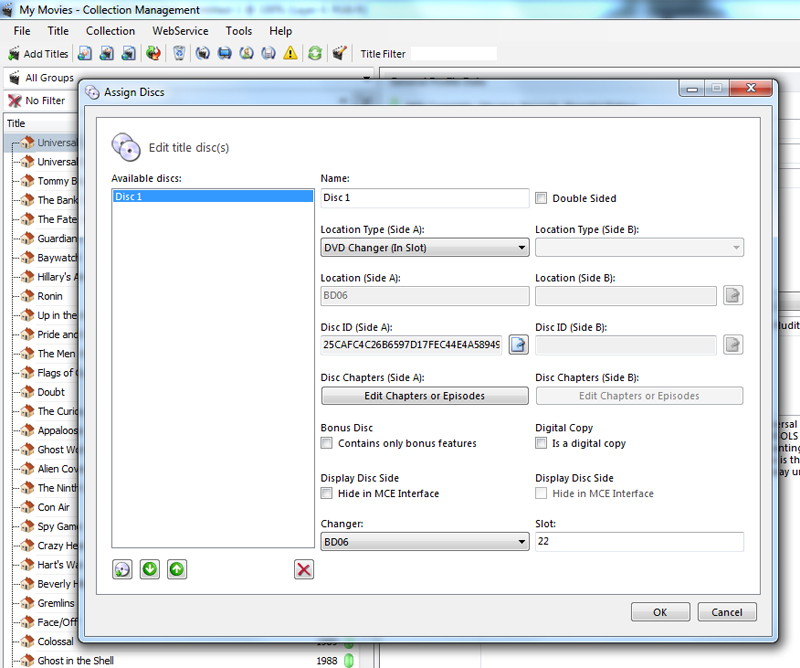 Also, I highly recommend use of the below modular adapters rather than pre-made serial cables. I've always got a dozen of each on hand in addition to varying lengths of network cables. If I need a serial cable I just grab the ends I need, set the pinouts on each accordingly and grab a spare network cable. Done deal. Monoprice DB9M/RJ-45,Modular AdapterMonoprice DB9F/RJ-45,Modular Adapter
And on a related note, it appears the changer support is limited to 9 com ports. That's all that's available in the drop down, COM Ports 1-9. Currently my HTPC only has 8 serial ports. I initially started out with 6 changers. I've got 10 now. Looks quite likely that if I add 2 additional serial ports to my HTPC the Collection Manager application is still going to be limiting me to 9 ports.
My DVD/Blu-ray CollectionHome Theater Gallery
|
|
Groups: Member
Joined: 3/10/2012
Posts: 46
Rank:
(2509)
|
Thanks for all the help, guys.
I do know what to do now to get this set up and how to add discs, but I'm having a problem I hope you can help me with.
When I go to add the changer, it will create the default name, DVD Changer 1, but then when I select the drop down box on DVD Changer Type, it is empty!
Two selections should appear, and have appeared in the past, one for my changer which is the Sony BDP-CX7000es and another one for the Sony 777es I believe.
Now that selection box is totally blank.
What happened to it and how can I get that back?
Thanks,
--J
|
|
Groups: Member
Joined: 2/17/2011
Posts: 377
Location: The Sunshine State, U.S.A.
Rank:
(3832)
|
I've never encountered the issue myself. Best I could advise is for you to uninstall My Movies, uninstall SQL, run the My Movies Clean Tool, delete any My Movies and SQL folders possibly left behind, then try installing again. ( FAQ: How can I fully uninstall My Movies.) Both Sony changer models should be present in the "Changer Type" drop down list just as my screenshots show, even on the current version of My Movies. There's no trick involved. The selections should just be there. You might also want to check to ensure the DLL files are present. C:\Program Files (x86)\Binnerup Consult\My Movies for Windows Media Center\Modules\DVD Changer\BDPCX7000ES.dll C:\Program Files (x86)\Binnerup Consult\My Movies for Windows Media Center\Modules\DVD Changer\DVPCX777ES.dll I'm still running My Movies 4.07, but the folder path shown above more than likely hasn't changed per the latest version of My Movies. Good luck. If I can think of anything else I'll be sure to chime back in.
My DVD/Blu-ray CollectionHome Theater Gallery
|
|
Groups: Member
Joined: 3/10/2012
Posts: 46
Rank:
(2509)
|
I ran the clean up tool. I then restarted my PC and re-ran the setup as administrator. Same problem. The changer type and input switcher drop down menus are blank.
I then looked for the directory and files you mentioned and that directory doesn't exist. I looked through every mymovies directory and subdirectory that does exist for those two files and they don't exist, either.
Thanks for your help. Any other suggestions would be much appreciated.
--J
|
|
Groups: Member
Joined: 12/26/2010
Posts: 471
Rank:
(146214)
|
My plain V5.24 Collection Management installation (standalone) has the following directory: C:\Program Files (x86)\Binnerup Consult\My Movies for Windows\Modules\DVD Changer
It contains the two DLL files mentioned by @fdavis71, so it would seem that I'm ready to use a changer.
However, since I don't have any changers attached to my system, the drop down list is also shown as empty on my system.
Are you sure you've attached the changer to your computer properly, and done everything needed to tell CM that you've got a changer attached?
|
|
Groups: Member
Joined: 2/17/2011
Posts: 377
Location: The Sunshine State, U.S.A.
Rank:
(3832)
|
The "Changer Type" selections should appear in the drop down regardless. My Movies doesn't validate whether the physical changers are present before making the selections available. The selections should just be there. If the DLL files (and accompanying folder structure) are not present on Jevansoh's system that certainly would explain why. Take the screenshots I posted earlier in this thread for example. Those were taken from a stand-alone My Movies installation running on my laptop. No changers are connected to the laptop and never have been. I do all my work with the Collection Management application on my laptop, much of it when I'm not at home. I also have a stand-alone My Movies installation running on my HTPC. That's the installation I actively use per the WMC7 functionality. All my changers are connected to the HTPC. I also don't allow my HTPC to access the Internet. If I want to update the instance of My Movies running on my HTPC I just backup the My Movies database on my laptop, then copying the file over the network and importing it to the installation on my HTPC. Yes, a bit unconventional, but it works for me. It's a stripped down box that runs My Movies for WMC7 and a Logitech Media Server. That's it. I don't use it for anything else. No need for it to access the Internet.
My DVD/Blu-ray CollectionHome Theater Gallery
|
|
Groups: Member
Joined: 12/26/2010
Posts: 471
Rank:
(146214)
|
Ok, so my drop-down menu for Changers was empty.
But then I'd never configured CM for Changers, since I don't have any.
Yup, it needs configuring, like @fdavis71 said earlier in this thread, with pictures. Just go to CM's menus: Tools->Disc Changers. Enter all the information needed to choose the Changer name, the type of Changer, the COM port it is on, etc. Click OK. I set up an imaginary Sony to test my CM installation.
Now I see a single changer in my drop-down menu for Changers.
From what I saw of the OP's last post, they don't have the DLLs in their system, which means he can't get past the adding "Disc Changers" step. I have no idea how those DLLs got lost!
If it would help, I would post those DLLs up here for them to use.
Cheers,
--michael
|
|
Groups: Member
Joined: 12/26/2010
Posts: 471
Rank:
(146214)
|
Here are the DLLs that are in my folder C:\Program Files (x86)\Binnerup Consult\My Movies for Windows\Modules\DVD Changer, as indicated in my earlier post. --michael File Attachment(s):
 BDPCX7000ES.dll (74kb) downloaded 22 time(s). BDPCX7000ES.dll (74kb) downloaded 22 time(s).
DVPCX777ES.dll (44kb) downloaded 19 time(s).
|
|
Groups: Member
Joined: 3/10/2012
Posts: 46
Rank:
(2509)
|
Thanks for the files. I downloaded them, created a subdirectory called "Modules" and under that created another subdirectory called "DVD Changer" and put the file there.
I then restarted Collection manager and the list is still blank.
The two DVD Changers should be in the drop down box whether they're configured on my computer or not but the drop down box is empty.
The drop down box for input switcher is also empty.
Thanks for the help, guys, but it still isn't working. :(
--J
|
|
Groups: Member
Joined: 12/26/2010
Posts: 471
Rank:
(146214)
|
Ok, so exit Collection Manager.
Stop and after a minute Start the My Movies General Service as a first step, maybe that will get it to load the DLLs?
Start Collection Manager again.
If that doesn't give you your drop down selection of Changers, then perhaps restarting your computer will do the trick?
You are running V5.24 final release of Collection Manager, and it is a fresh installation?
I followed along all the beta versions of V5.24 up to the official release, never uninstalling My Movies even once. I wonder if one of the previous beta versions had the Changer DLLs and audio Switcher support in it, and the 5.24 official release does not for some unknown reason?
I don't have time to test that. If you have a copy of the last beta6 version of 5.24, try installing that and then installing 5.24 final release over top.
I have a copy of all the betas, and I could put the last few up on Dropbox for you if that would help.
--michael
|
|
Groups: Member
Joined: 3/10/2012
Posts: 46
Rank:
(2509)
|
I tried everything you said to try, with no luck.
Yes, I'm running a fresh installation of 5.24.
I'm beginning to think it's broken in this release.
I'd really appreciate it if you could post to dropbox an older version for me to try.
Thanks,
--J
|
|
Groups: Member
Joined: 12/26/2010
Posts: 471
Rank:
(146214)
|
Beta versions of 5.24 CM, and last version of 5.23 with Boxset fixI expect one of these will put the correct files in the right place and link it in to the installation properly, after which you'll be able to see that drop-down. Then, I think, you can upgrade again to the official and most recent v5.24 release and it should continue to work. Fingers crossed! --michael
|
|
Groups: Member
Joined: 3/10/2012
Posts: 46
Rank:
(2509)
|
Thanks Michael.
I installed each of them, one by one, in order of oldest to newest and unfortunately, none of them worked.
I'm thinking it got broken earlier.
Do you have any late build 4.x or really early 5.x builds available to share?
Thanks,
--J
|
|
Groups: Member
Joined: 12/26/2010
Posts: 471
Rank:
(146214)
|
Yes, storage is cheap!
I've added to that folder V4.02, 4.04 all builds, 4.06, and 5.00 all builds, and all the rest that I've still got lying around. I must have gotten rid of the ZIP files for a couple, so there's only the EXE installer for those.
Cheers,
--michael
|
|
Groups: Member
Joined: 2/17/2011
Posts: 377
Location: The Sunshine State, U.S.A.
Rank:
(3832)
|
I performed a clean installation of 4.07 in the recent past and encountered no issues with the changer support. DLL files present and accounted for as were the "Changer Type" selections from CM. The 4.07 installer won't be able to download and install SQL though. You'll have to follow the manual steps I outlined in a couple other posts. See below. fdavis71 wrote:Hello ede. I completely wiped out my Windows 7 64-bit installation of My Movies and SQL not too long ago and was able to successfully install My Movies 4.06 which uses SQL 2005. The steps I took are outlined below. 1. Uninstalled My Movies from Programs and Features. 2. Uninstalled all instances of SQL from Programs and Features. 3. Ran the My Movies Clean tool. 4. Deleted any My Movies and SQL directories left behind. 5. Downloaded Microsoft SQL Server 2005 Express Edition (SQLEXPR.EXE) and renamed the file, "SQLEXPR32.EXE". (When attempting to install My Movies 4 prior to this SQL would fail to download and install. Checking the "C:\ProgramData\MyMovies" directory created by the installer I found a file 0kb in size named, "SQLEXPR32.EXE".) 6. Ran the My Movies 4 installation file. Prior to selecting the type of installation I placed the "SQLEXPR32.EXE" file in the "C:\ProgramData\MyMovies" directory the installer created. 7. Selected the type of installation (stand-alone in my case) and next. The installer then showed that it was attempting to install SQL, a separate dialog box being displayed wanting to run the "SQLEXPR32.EXE" file. Selected the option to run the file. 8. After a time I received another separate dialog box asking if I was sure I wanted to install SQL and that if I did "Microsoft SQL Server 2005 Service Pack 3" should be installed afterwards. I selected the option to continue with the SQL installation. 9. After a few minutes the My Movies installer notified me that the required components for My Movies had been installed, the option given to install the actual My Movies application. The My Movies installation completed successfully at that point. When running the Collection Management application it was able to connect to the My Movies database instance without issue prompting me to log in to my account which I was able to do. Once logged in I was able to restore my local My Movies 4 database that I had backed up. Have tested extensively since then encountering no issues.
My DVD/Blu-ray CollectionHome Theater Gallery
|
|
Groups: Member
Joined: 3/10/2012
Posts: 46
Rank:
(2509)
|
Well, I installed 4.06 but didn't see any support for disc changers. I saw something for firewire changers but nothing for disc changers.
I then installed 5.0 build 2, which was the next newest version posted in the dropbox folder, and it installed properly but unfortunately, the disc changer and input switcher drop down boxes are still empty.
Does 4.06 not support disc changers? 4.07 does? If so, could I get a copy of 4.07 please?
Thanks,
--J
|
|
|
guest |