 |
My Movies
»
My Movies for Windows
»
Support
»
Chameleon MediaCenter v3.6 is now available
|
|

Groups: Member
Joined: 5/13/2009
Posts: 301
Location: Georgia, USA
Rank:
 (3548) (3548)
|
I just noticed that some pages of my original Chameleon MediaCenter post is not viewable on the forum anymore - it's generating an Invalid Cast error when you try to view the last page. I guess that means it's time to start a new thread. That original post, from nearly 3 years ago, now has over 14-thousand views, making it one of the most viewed topics on this forum. I think that is a good indication that there are still a lot of users out there who love My Movies as much as I do, and want to keep enjoying it for many years to come. That's why I continue to improve Chameleon MediaCenter for all of us, making it easier, faster, and more functional with every release. What is Chameleon MediaCenter?Chameleon MediaCenter, or CMC, is a built-from-scratch standalone program that primarily emulates the look of the My Movies WMC plugin for displaying your My Movies collection. CMC works alongside My Movies, so you will still use My Movies Collection Management to maintain your collection. 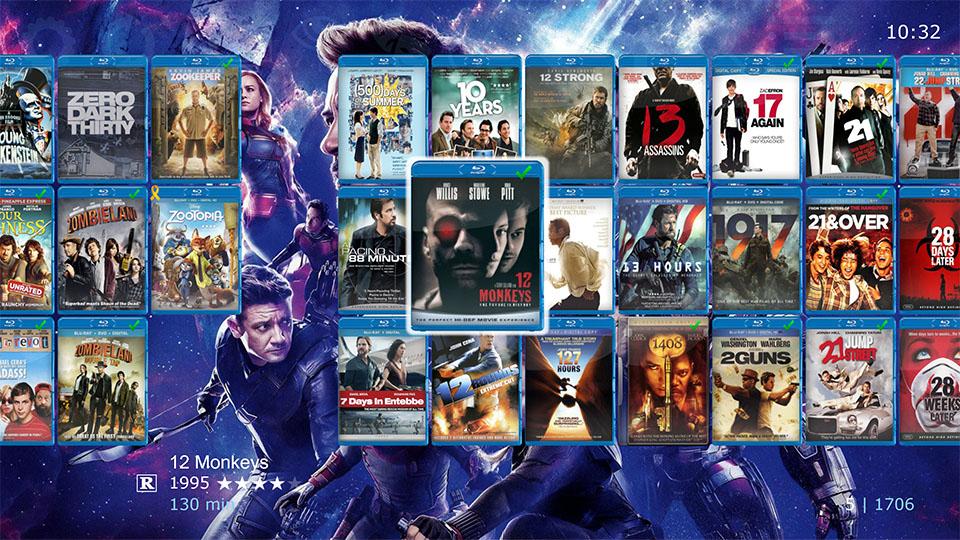 CMC really comes alive if you have at least 2500 My Movies Contribution Points, which grants you access to the My Movies API. CMC can use the My Movies API to get the best metadata possible. Your My Movies collection will look best on CMC - far better than Kodi, Plex or XBMC could ever hope to achieve. If you don't have the necessary My Movies points, you should definitely buy them. CMC will not only look better, but also be much easier to use, the result is worth it. And hint-hint, nudge-nudge, the best is yet to come, as a future update to CMC will offer even better integration with CMC and My Movies, including offline titles and discless movies! 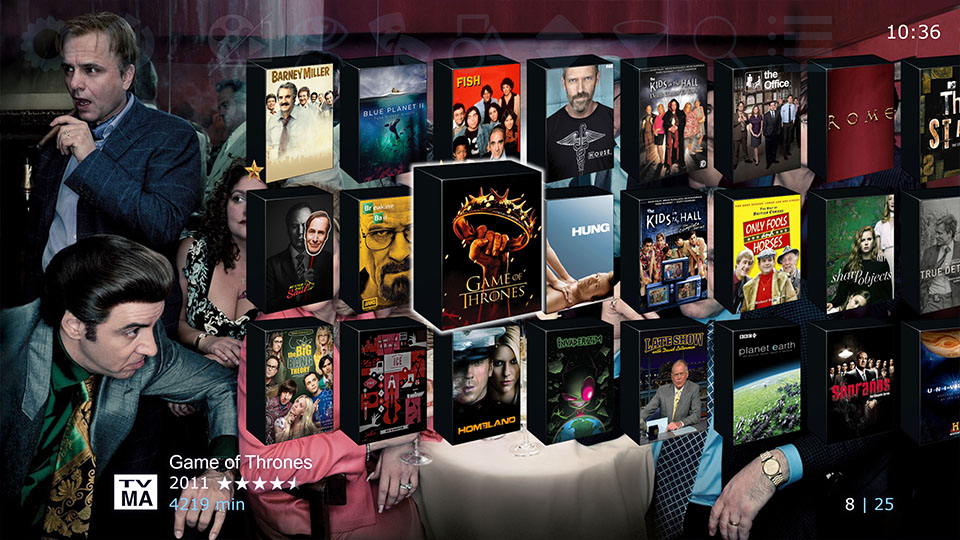 One of the main benefits of CMC vs. WMC is that CMC is still actively maintained, unlike WMC where Microsoft has actively shut down functionality and completely removed support. Since I first released v1.0 almost 3 years ago now, there have been 48 notable updates, 17 of those were major version updates, and 7 of those major new versions came in just the past year! Another benefit of CMC is that I've spent a lot of time integrating it with popular video players, so you don't have to tweak connection scripts or figure out how to make it work. CMC simply works with the latest players out of the box: MPC, CyberLink PowerDVD, DVDFab Player, VLC, PotPlayer, even JRiver. CMC will automatically mount ISOs for playback, and can also handle DVD Folders, and all popular transcoded media formats like MP4's and MKV's. 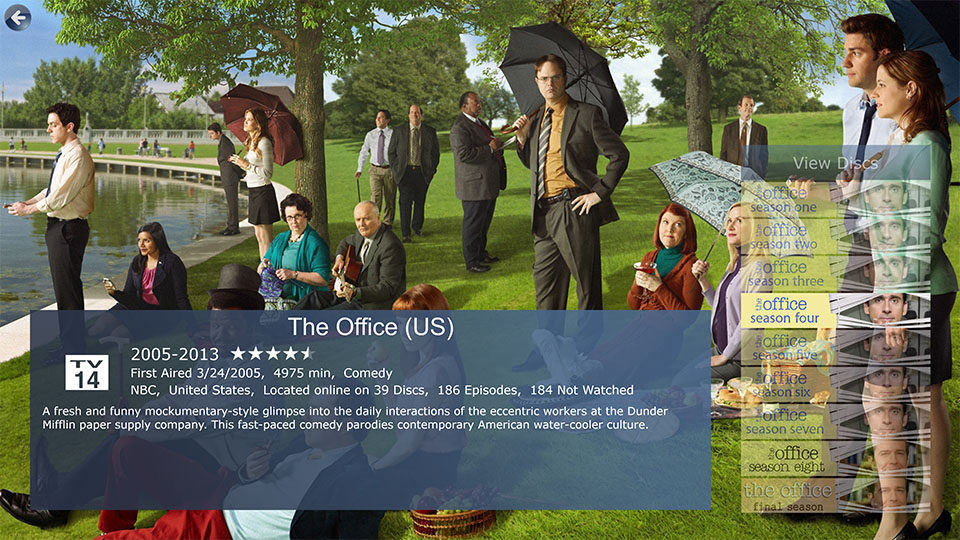 CMC also has advanced capabilities, like directly playing Episodes (if they've been mapped in My Movies) on ISO's or Folder rips. This works incredibly well with MPC, which supports direct playback of Blu-ray and DVD episodes. If you configure MPC as your TV Episode player, then CMC will even auto-play each episode one-after-another, just like streaming TV but without the commercials! 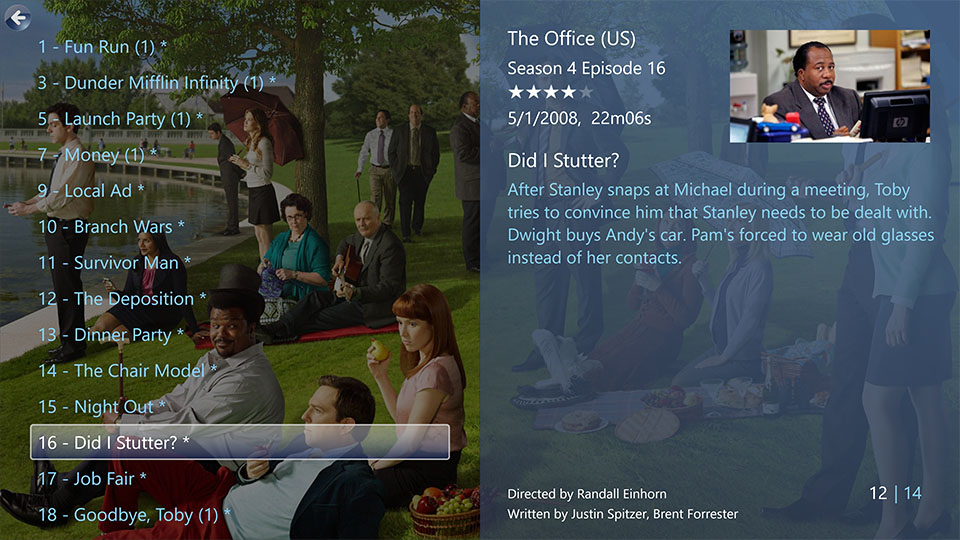 CMC lets you enjoy what was so great about My Movies on WMC, but without having to struggle with keeping legacy Win7/Win8.1 installs operational, or hacking WMC onto Win10. As you browse around your My Movies collection in CMC, I think you'll be surprised just how closely it resembles My Movies on WMC - well, except for how fast it is. CMC is much faster than WMC could ever hope to be! 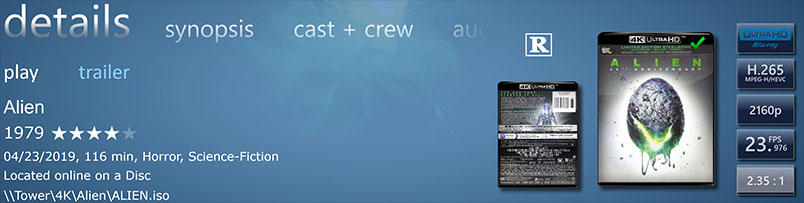 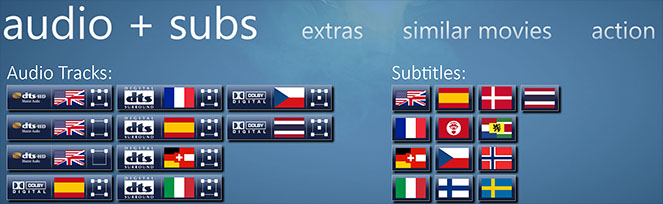 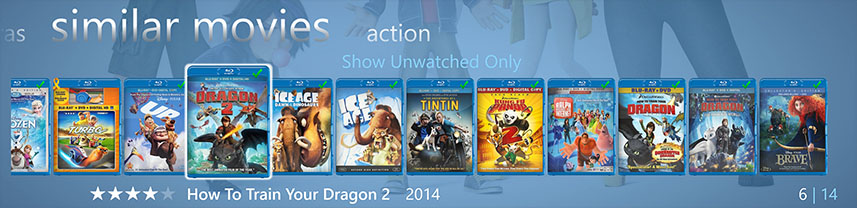 Plus a Music Library! Plus a Music Library!CMC has also recreated some great WMC features - most notably the Music Library. CMC has an audiophile class audio-engine built-in that supports all of the common music media formats. I think you'll be surprised how closely CMC recreates that incredible WMC Music Library, including how covers are arranged and even that amazing CD cover waterfall screensaver. Or if you prefer, play a photo slideshow of your favorite memories while you listen to music. 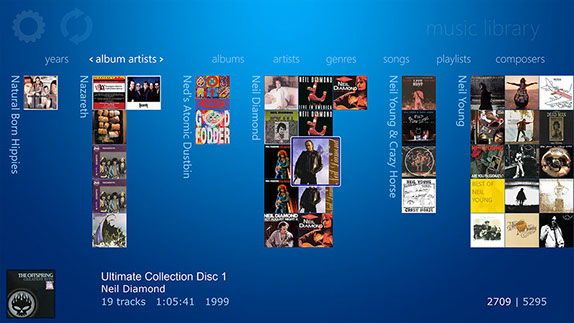 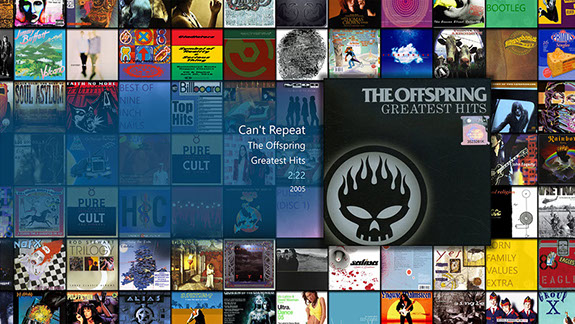 Plus an App Launcher! Plus an App Launcher!Another great features of CMC are the External Links, which is a powerful App and URL launcher. CMC can launch dozens of pre-configured Win10 apps like Netflix, Hulu, Steam, and many more, or open any URL in the browser of your choice. After all, shouldn't a MediaCenter be the hub of your HTPC? CMC understands that you want to do more with your HTPC than simply playing Blu-rays, so it makes it easy to jump to other apps, and easy to get back.  One of the great benefits of the External Links app launcher is that you can easily open DVR apps, like SiliconDust's HDHomeRun, which let's you record and watch live TV from free over-the-air (OTA) or even cable channels depending upon the HDHomeRun box you get. CMC launches the HDHomeRun app so quickly and easily, it almost feels like you have a DVR integrated into CMC. Long story short - Chameleon MediaCenter is absolutely the best way to enjoy your My Movies media collection. Plus your prized music collection. Plus running your other favorite HTPC apps. If you haven't discovered CMC yet, or haven't tried a recent version, you should definitely head HERE and check it out. There's a ton more functionality available, way too much to detail it all here. -Paul I'm not just the CMC creator, I'm also a CMC + My Movies user
Chameleon MediaCenter (CMC) v7.0 - A FREE WMC replacement GUI for My Movies Collection Management on Win7/8.1/10/11, plus a Music Library and App Launcher!
|
|
Groups: Member
Joined: 5/13/2009
Posts: 301
Location: Georgia, USA
Rank:
(3548)
|
My last post detailing updates for Chameleon MediaCenter in the original thread was for v3.4, which I released back in June. Yesterday I released CMC v3.6, so I will summarize the last two releases here. Since the original thread is corrupt, you can no longer see the updates for the past several versions that I covered there. If you want more info on all the great improvements to CMC, go HERE. Photo SlideshowsIn CMC v3.5 was a brand new feature, Photo Slideshows. Many of you loved the photo slideshow feature in WMC, and this is our first step toward recreating this must-have feature. CMC's Slideshows do not have the fancy WMC style scrolling photo animations - at least, not yet - but CMC does have one capability that WMC never had: displaying your online photos from the cloud! CMC supports both local photos as well as online Google Photos. In the future, we will add more online services based on user feedback, so feel free to let me know what services you want CMC to connect with for displaying Photo Slideshows. It's truly amazing to view my Google Photos albums, which freshly snapped pictures from a recent outing, while listening to my favorite music. Side note here: CMC v3.6 has added a Privacy Policy, prominently displaying on the home page the first time you use it, and again if there are ever updates. This is to comply with Google's requirements for CMC becoming a "Trusted" app, so hopefully soon you won't see those scary untrusted app warnings when you connect CMC to Google Photos. Having an official CMC Privacy Policy is also important for users concerned about how their personal information is used, and if you bother to read it then hopefully you will appreciate that we take protecting your info very seriously. Unique Sorts for each Media Type viewCMC v3.6 adds the ability to set unique defaults sorts for each Media Type. For example, now you can have your Movies sort by Prod Year Descending, TV Shows sort Alphabetically Ascending, and still have All Media Types sort by most recently added. Hopefully you appreciate this small enhancement as much as I do - I was fed up with having to change my sort every time I switched from Movies to TV Series. And since you could already program CMC Hotkeys into your remote to switch between Media Type views, this now means that with a single button press you can switch both the view and the sort - awesome! Customizing Your Browsing ExperienceWhile CMC has definitely grown rather sophisticated, with an enhanced TV Series view that lets you browse by season and episode, and even displays the season banner images if you have them set in My Movies, we understand that not all users want these features. CMC v3.6 actually has a couple new toggles to turn off features: you can now disable Season Banner Images so you get a consistent season button style, and you can also disable the enhanced TV Series view altogether, so you can browse your TV Series as discs if you prefer. Performance ImprovementsI'm absolutely obsessed with making CMC the fastest it can be - I'm just too impatient a person to sit around waiting on a slow program to refresh the screen. There's a few areas that have received some performance improvements in v3.6, including the Cast+Crew viewing that used to slow to a crawl if you had more than about 50 actors in the list - now it is super fast. I've also improved the speed of grabbing metadata from the My Movies API by implementing a high-performance XML library - long story short it is about 10% faster than before. Bug FixesI'm happy to say that after 3 years in development, CMC is mostly bug-free. But that's not to say there aren't issues to be found and fixed. Since v3.4, I've fixed at least 20 issues, mostly minor but they were annoyances all the same. Altogether, this makes CMC v3.6 the best version of Chameleon MediaCenter yet. Have you tried it yet?
-Paul P.S. - CMC v4.0 is coming soon, and it is going to be amazing!
Chameleon MediaCenter (CMC) v7.0 - A FREE WMC replacement GUI for My Movies Collection Management on Win7/8.1/10/11, plus a Music Library and App Launcher!
|
|
Groups: Member
Joined: 4/9/2010
Posts: 41
Rank:
 (2619) (2619)
|
I stayed with WMC running Windows 7 until this weekend. Three years ago I bought a license for Chameleon (MyMovies Browser at the time). I thought it was promising but WMC was working so we stayed with until now.
Purchasing a 4K TV prompted me to finally ditch WMC as 4K on Windows 7 isn't a great experience. Anytime it jumps back to native resolution you need binoculars to read the screen. I was pleasantly surprised by all the work that has gone into CMC in the meantime.
I ran the small program provided with CMC that updates the metadata in the MyMovies folders for CMC and programmed the MCE remote in CMC's settings so I can use it to browse TV series and movies and launch Win10 apps (HDHomeRun, Netflix) and browser based Amazon Prime and YouTube plus launch the VLC and MPC-BE media players. I showed family members how the remote works and everyone is happy. I hadn't checked out MPC-BE lately, I really like how it integrates with CMC and how easy it is to fast forward.
I've looked at Emby, Plex and Kodi but none of them were a direct replacement for WMC/MM. CMC provides the same features for TV Series and Movies stored on our media server (Win7 running DrivePool) and is able to launch the other apps we use for viewing so I'm very happy with the overall experience.
|
|
Groups: Member
Joined: 3/18/2019
Posts: 18
Rank:
 (0) (0)
|
dsteinschneider wrote:I've looked at Emby, Plex and Kodi but none of them were a direct replacement for WMC/MM. CMC provides the same features for TV Series and Movies stored on our media server (Win7 running DrivePool) and is able to launch the other apps we use for viewing so I'm very happy with the overall experience. I totally agree. The best software application that I have purchased for my HTPCs.
|
|
Groups: Member
Joined: 8/13/2010
Posts: 90
Rank:
(2627)
|
I think this maybe a better solution, with the app launcher
does it have remote control support? If so can you open and close it with remote?
|
|
Groups: Member
Joined: 5/13/2009
Posts: 301
Location: Georgia, USA
Rank:
(3548)
|
Yes, you can open and close apps with the remote. The app launcher is built into the CMC GUI, so you navigate to what you want to launch and press OK/enter to launch it. For pre-defined apps/URLs (CMC has dozens), you can even configure them in the CMC settings with the remote, but if you want to do a custom app/URL, you'll have to pull out your keyboard/mouse to configure it. CMC includes a built-in MCE remote programmer that configures a few essential buttons. This includes a few buttons to launch CMC, and most importantly, a button to perform the Windows hotkey ATL+F4, which closes pretty much any and every Windows program that has focus. I came up with this solution for PowerDVD, which is a really poorly behaved program. Not only does PowerDVD not include a close action (I guess they think you would never want to do anything else?), but PowerDVD also intercepts most remote button presses, preventing other programs from seeing them. After implementing a button to do ALT+F4 for closing PowerDVD, I was happy to discover that this is the "One Button to Close Them All", it simply works everywhere. Some programs you may have to press Close a couple times and OK through prompts to successfully exit them. For example, you can launch Steam to play games, and then when you're done you'll have to Close twice to fully exit, as the first close exits the big screen mode, but leaves a 2nd windowed app running. And because CMC is running in the background the whole time (taking very minimal resources), as soon as you close out of whatever you launched, you're back to CMC. And yes, the Close button closes CMC too. While a license is required to display more than 101 movie or album titles, the app launcher functionality has no restrictions, it's completely free.
I should mention that the app launcher will get even better in the future. The current solution has 9 open slots that you can configure for whatever you want, with the last two slots reserved for switching between the My Movies Library and the Music Library. I didn't realize how popular the app launcher would become, and just how many different apps that users would want to configure. 9 is just not enough, so I have plans to increase this to several dozen, probably about 44 - hopefully that will be enough even for demanding users. -Paul
Chameleon MediaCenter (CMC) v7.0 - A FREE WMC replacement GUI for My Movies Collection Management on Win7/8.1/10/11, plus a Music Library and App Launcher!
|
|
Groups: Member
Joined: 8/13/2010
Posts: 90
Rank:
(2627)
|
Yikes!! $22.00 per machine? I have 10 machines.
I didn't realize how expensive it was, sorry, I withdraw my statement saying it to be a good alternative. For that type of money it would require the HD Live TV support.
Guess that's what turned me off last time I looked at it. BUT it is a good piece of coding.
|
|
Groups: Member
Joined: 5/13/2009
Posts: 301
Location: Georgia, USA
Rank:
(3548)
|
First, I get the impression that you haven't even tried CMC yet. Perhaps you would change your mind on the value proposition if you tried it and discovered everything it offers. Many users have asked me to add a donate button because they feel I'm not charging enough for the value they get. You can try it for free, everything works on the unlicensed version with the only limitation being you'll only see 101 Movies/TV Series. Second, you don't have to put CMC on every PC you own. You could just put it where you watch your collection. Just because you run CMC on one PC doesn't mean you have to migrate all your PC's. Third, while CMC doesn't have built-in HD Live-TV support, it works great to launch SiliconDust's HDHomeRun app. You can buy a HDHomeRun network tuner for live Over The Air (OTA) or Cable TV that gets shared with all your PC's, and you can easily switch back and forth between CMC and HDHomeRun. CMC even includes a dedicated hotkey to launch HDHomeRun. I use the HDHomeRun myself, and up above dsteinschneider mentions he does too. I'm sure he would give more first-hand experience on how well this works if you ask. While HDHomeRun is not truly integrated, in my opinion it launches so fast it feels integrated. You push one button on your remote, and in a few seconds you are in the HDHomeRun app watching live TV or DVR recordings, and you push another button and you're immediately back to CMC. It works so well, I'm not even sure what integrating that functionality inside CMC would improve... perhaps better remote control behavior and more consistent visual style, but ultimately the end result would be extremely similar. And I'm open to providing app launcher integration with other network TV tuner apps if users want them. This, to me, is one of the biggest benefits to CMC. Instead of trying to be the one app that does everything poorly, it does a few things better than all other apps, plus makes it easy to get to other best of breed apps to fill in any gaps. PowerDVD and MPC are both incredible video players, so rather than recreate that functionality I've made CMC really, really good at launching these and other players so you can use the best players available, not some mediocre player I developed. The app launcher is an extension of this concept. For example, I looked at making an integrated podcast manager/player, but honestly it was never going to be as good as already available podcast players, so the solution was to make it easy for you to launch your own favorite podcast player. That way you can listen to and watch your podcasts no matter where you are, or what device you're using - your phone, your tablet, your laptop, your desktop, and your HTPC. If I tried to integrate that into CMC, then I would really need to provide a solution for all possible platforms, otherwise it would just be a mediocre replacement that no one would use. There are also hotkeys to launch up to 9 configured External Links (apps/URLs), in addition to the dedicated hotkeys for launching HDHomeRun and Steam. Since you can program these hotkeys into a learning remote, that makes CMC really good at being a HTPC hub. So don't be so quick to discount CMC because a certain feature isn't implemented inside CMC, because the app launcher makes every feature just a button push away. And lastly, I've mentioned before that I'm open to doing a volume licensing discount. If you truly want 10 licenses, which is more than any other single user has needed so far, then I think we can come to a fair arrangement. Just send me a support request on my website. Paul
Chameleon MediaCenter (CMC) v7.0 - A FREE WMC replacement GUI for My Movies Collection Management on Win7/8.1/10/11, plus a Music Library and App Launcher!
|
|
Groups: Member
Joined: 5/13/2009
Posts: 301
Location: Georgia, USA
Rank:
(3548)
|
Just a quick announcement - CMC v5.0 is being released in a few days, and it will be completely free. While I greatly appreciate every CMC user who purchased licenses to fund CMC's development, it's reached a point that it no longer makes sense for me to charge for CMC. As always, CMC will remain ad-free and does not collect any personal data collection. You will still need at least 2500 My Movies Points to unlock the My Movies API, which is the best way to use CMC. I've read the recent posts about issues with WMC and IE 11, possibly the final gasp of the infamous WMC. For My Movies users looking for an alternative, Chameleon MediaCenter is the best option. For the moment, CMC v4.2 is still available to use with a 101 title trial-limited restriction - that's perfect to get CMC installed and talking with My Movies and make sure you like it. Then in a few days when CMC v5.0 is released, the limitation will disappear. Also, ignore the license purchase page on the website, no need to purchase any licenses. It will soon be replaced by a voluntary donation page, for those that wish to contribute to CMC's ongoing development. -Paul
Chameleon MediaCenter (CMC) v7.0 - A FREE WMC replacement GUI for My Movies Collection Management on Win7/8.1/10/11, plus a Music Library and App Launcher!
|
|
Groups: Member
Joined: 5/13/2009
Posts: 301
Location: Georgia, USA
Rank:
(3548)
|
CMC v5.0 is now available, and as promised it is now free to use for everyone. Read more here: https://www.mymovies.dk/forum.aspx?g=posts&t=46941-Paul
Chameleon MediaCenter (CMC) v7.0 - A FREE WMC replacement GUI for My Movies Collection Management on Win7/8.1/10/11, plus a Music Library and App Launcher!
|
|
|
guest |
| Forum Jump
|
You cannot post new topics in this forum.
You cannot reply to topics in this forum.
You cannot delete your posts in this forum.
You cannot edit your posts in this forum.
You cannot create polls in this forum.
You cannot vote in polls in this forum.
|
Main Forum RSS : 
Powered by Yet Another Forum.net version 1.9.0 (NET v4.0) - 10/10/2006
Copyright © 2003-2006 Yet Another Forum.net. All rights reserved.
|
|