|
|
Groups: Member
Joined: 1/2/2008
Posts: 70
Location: Washington State
Rank:
 (31047) (31047)
|
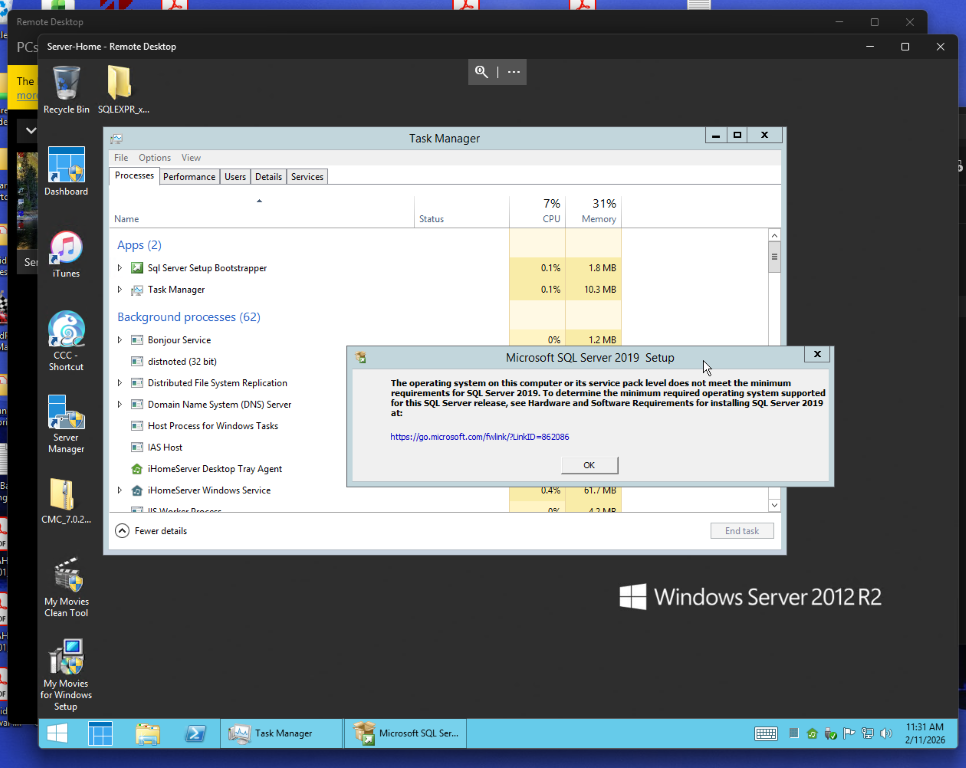
I tried installing the new 5.43 on my server 2012r2. I uninstalled my older version 5.40 and used the clean tool, rebooted and went to install 5.43 as client and server. Sql would not install with the error 2067529676. I tried to install as a standalone, same error. Tried the offered option to install, and it said that it could not install on anything less than server 2016. How do I work around? File Attachment(s):
 Screenshot (134).png (263kb) downloaded 19 time(s). Screenshot (134).png (263kb) downloaded 19 time(s).
bill attached the following image(s):
My Movies 5.40 Essentials Server & Clients Windows Server 2012r2 Essentials Windows 10 Pro My Movies Pro 5 for iPhone IOS 26.01
|
|
Groups: Member
Joined: 1/2/2008
Posts: 70
Location: Washington State
Rank:
(31047)
|
Any update on this....?
My Movies 5.40 Essentials Server & Clients
Windows Server 2012r2 Essentials
Windows 10 Pro
My Movies Pro 5 for iPhone
IOS 26.01
|
|

Groups: Administration
, Windows RT/8 Discussion Group
Joined: 2/1/2005
Posts: 50,429
Location: Aarhus, Denmark
Rank:
 (3167) (3167)
|
|
|
Groups: Member
Joined: 1/6/2022
Posts: 5
Location: Switzerland
Rank:
 (1619) (1619)
|
What's there to look into, Binnerup Consult? If you're using SQL Server 2019 as the underlying DBMS, then your software simply isn't compatible with Windows Server 2012 anymore ... or any desktop version below Windows 10, for that matter. https://learn.microsoft.com/en-us/sql/sql-server/install/hardware-and-software-requirements-for-installing-sql-server-2019Update your compatibility list and be done with it
|
|
Groups: Administration
, Windows RT/8 Discussion Group
Joined: 2/1/2005
Posts: 50,429
Location: Aarhus, Denmark
Rank:
(3167)
|
|
|
Groups: Member
Joined: 8/10/2014
Posts: 446
Rank:
(90542)
|
The SQL Server process version I'm seeing in Task Manager is "SQL Server Windows NT - 64-bit" on my Windows 10 system with MyMovies V5.44 PR2. The process eats a lot of memory.
Is "SQL Server Windows NT" the correct version of the software for MyMovies on Windows 10, or should it be something newer?
|
|
Groups: Member
Joined: 1/6/2022
Posts: 5
Location: Switzerland
Rank:
(1619)
|
You're looking at the right process, but what you're seeing is just the name/description, not the version. To see the version, right-click on the process, select properties and then go to the Details tab.
If the product version there starts with 15.0, then you're using SQL Server 2019 ... which is the correct version for My Movies 5.42 and above, as far as I understand things.
If it starts with 11.0 or 12.0, then you're still on SQL Server 2012 or 2014 respectively
SQL Server is known for potentially consuming a quite substantial amount of memory, by the way. That memory consumption can be capped via configuration, but I don't think the My Movies installation is doing that.
|
|
Groups: Member
Joined: 8/10/2014
Posts: 446
Rank:
(90542)
|
chbi wrote:You're looking at the right process, but what you're seeing is just the name/description, not the version. To see the version, right-click on the process, select properties and then go to the Details tab.
If the product version there starts with 15.0, then you're using SQL Server 2019 ... which is the correct version for My Movies 5.42 and above, as far as I understand things.
If it starts with 11.0 or 12.0, then you're still on SQL Server 2012 or 2014 respectively
SQL Server is known for potentially consuming a quite substantial amount of memory, by the way. That memory consumption can be capped via configuration, but I don't think the My Movies installation is doing that. Thanks. Looking at the details of the process, it is showing "Product version: 12.0.6024.0" and "File version: 2014.120.6024.0". As noted, I'm running Windows 10. Curious whether there is anything to be gained by upgrading SQL Server. The only thing I'm really using it for is MyMovies
|
|
Groups: Member
Joined: 1/6/2022
Posts: 5
Location: Switzerland
Rank:
(1619)
|
That's for Binnerup to answer. According to their release notes, it seems mostly relevant for Windows 11. Quote:Change: The installer now installs SQL Server 2019 over 2014, as SQL Server 2014 got into issues with a removed PowerShell on Windows 11 Be aware though that SQL Server 2014 is out of vendor support and doesn't receive any (free) security updates from Microsoft anymore. Whether or not that's a risk you're willing to accept is up to you, I guess.
|
|
|
guest |