


My Movies Disc Copier
Introduction
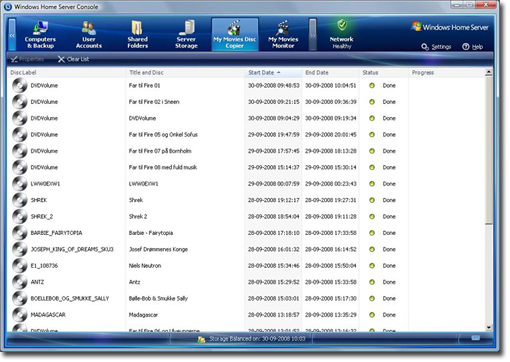
 My Movies Disc Copier is a fully automated DVD or Blu-ray disc copier*, that allows you to automatically copy your movies directly to the Home Servers storage making it available to Media Centers, such as Microsoft Media Center, Media Portal, XBMC and many others.
Your movies can be copied to either VIDEO_TS formats for DVD's, ISO format for DVD or Blu-ray, or an Media Center Extender compatible MPEG-2 format for DVD's, or you can copy both to a VIDEO_TS format as well as an MPEG-2 format for DVD's, allowing the full VIDEO_TS structure to be played on the main Media Center, and the MPEG-2 file on your Media Center Extender.
Disc copying have never been easiser, simply insert a DVD or Blu-ray into an optical drive, and the copy process will start automatically, while you have a full detailed overview in your Windows Home Server console, after about 15 minutes for a DVD, or about 45 minutes for a Blu-ray, depending on the size of the disc, and the processing power of your Home Server, the disc will again be ejected from the drive.
* Due to legality in several countries, My Movies do not backup copy protected DVD, HD-DVD or Blu-ray titles. Users in countries that allow circumventing CSS and AACS copy protections when backing up their movies can install SlySoft AnyDVD or AnyDVD HD to remove these copy protections.
Optical Drive Requirement
DVD or Blu-ray disc copying of course requires an optical DVD or Blu-ray drive connected to your Windows Home Server - while many home built Home Servers may already have an internal drive attached, most factory shipped products does not include an optical drive, in which case you can add any USB 2.0 or eSATA connected drive. After a reboot, the My Movies Disc Copier automatically recognizes the drive, and will automatically detect when a DVD or Blu-ray is inserted into the drive. Notice that to copy Blu-ray discs, you must have a Blu-ray drive, as Blu-ray discs cannot be read from an ordinary DVD drive.
 Windows Home Servers is for many devices designed to be placed outside the livingroom, in a basement, in a technician room or similar, and adding an optical drive to the home server might be easy, while adding it in an easy accessible position in the house may be harder - fear not, as the cable length of an USB 2.0 device is 5 meters (16.4 feet), and can be extended with a repeater device, or be used over Cat5e cables by using a USB to Cat5e extender device.
Advanced Meta-Data
The advanced, and high quality meta-data added by the My Movies Disc Copier is provided from My Movies own WebService, our community build data service, where thousand of users takes part in ensuring accurate and high quality data. Data is downloaded from our multiple highly stable and very fast professional servers, hosted in Denmark, by our high quality professional hosting partner Fuzion, to ensure that you always get the highest quality meta-data at all times a day.
By connecting a My Movies Client to your Windows Home Server, you can yourself take part in the community, and further improve meta-data, not only for your own titles, but for all users of our service.
Pricing
My Movies Disc Copier is based on My Movies advanced licensing options, where users create a My Movies user account, and aqquire points for the user account either by contributing movie meta-data to gain the points or by paying for the points directly. This means that you do not pay for a single product, but pay for the right to use our full product suite, not only for Windows Home Server, but in general, and you are not required to pay for continued updates to the programs, but can upgrade the products in their full lifetime without any additional fees.
Usage of the Movie Disc Copier requires 1,250 points, equaling a $50 payment to your My Movies account, or a contribution of 30 fully completed movie profiles to our Movie WebService, and also gives you usage rights to the music disc copier as well as the freely available movie monitoring function.

